We have compiled a list of manufacturers, distributors, product information, reference prices, and rankings for Design CAD software.
ipros is IPROS GMS IPROS One of the largest technical database sites in Japan that collects information on.

Design CAD software Product List and Ranking from 6 Manufacturers, Suppliers and Companies | IPROS GMS

Last Updated: Aggregation Period:May 27, 2026~Jun 23, 2026
This ranking is based on the number of page views on our site.

Design CAD software Manufacturer, Suppliers and Company Rankings

Last Updated: Aggregation Period:May 27, 2026~Jun 23, 2026
This ranking is based on the number of page views on our site.

  1. EPLAN Kanagawa//Industrial Electrical Equipment
  2. 図研アルファテック Kanagawa//CAD/CAM
  3. ニソール 本社 Saitama//CAD/CAM
  4. 4 ECAD Solutions Co., Ltd. Saitama//CAD/CAM
  5. 5 Design Creation Inc. Tokyo//software

Design CAD software Product ranking

Last Updated: Aggregation Period:May 27, 2026~Jun 23, 2026
This ranking is based on the number of page views on our site.

  1. Standardization of Electrical Symbols: Comparison of IEC (New JIS), NFPA, and Old JIS EPLAN
  2. Technical Document: "What You Need to Know for Standardizing Electrical Design" EPLAN
  3. Project Viewer Eplan eView EPLAN
  4. 4 Digital instructions for control panel wiring work Smart Production EPLAN
  5. 5 [Industry of Introduction] Automotive Industry EPLAN

Design CAD software Product List

1~24 item / All 24 items

Displayed results

Technical Document: "What You Need to Know for Standardizing Electrical Design"

Electrical design compatible with IEC and new JIS! We are currently offering free technical materials that clearly explain the concepts of standards to promote standardization in line with international standards!

Standardization of electrical design is often mentioned, but specific methods are not widely discussed. This is because it requires consideration of the know-how and design philosophies that each company possesses, making it a complex issue. This document briefly summarizes the necessary overview for standardization in accordance with IEC and new JIS standards. It explains the position-oriented approach of "JIS C 0452-1 IEC 81346-1," as well as function-oriented and product-oriented approaches using diagrams. For over 30 years, EPLAN has been accumulating expertise in electrical design, not only in standardization but also in the introduction of comprehensive electrical design CAD. Please consult us! 【Contents (excerpt)】 ■ List of standards covered ■ What is the hierarchical structure of drawings "JIS C 0452 IEC 81346"? ■ What is document classification and specification "JIS C 0451 IEC 61355"? ■ NFPA "North American standard" ■ Conclusion *Technical materials are currently available for free! Please download to learn more.

  • Company:EPLAN
  • Price:Other
  • 2D CAD Electrical
  • others
  • Design CAD software

Added to bookmarks

Bookmarks list

Bookmark has been removed

Bookmarks list

You can't add any more bookmarks

By registering as a member, you can increase the number of bookmarks you can save and organize them with labels.

Free membership registration

Digital instructions for control panel wiring work Smart Production

Intuitive assembly and wiring work of components in the control panel manufacturing process.

Eplan Smart Production digitally supports the creation of control panels. Assembly and wiring tasks can be carried out step by step with guidance displayed according to a checklist, allowing anyone to work without confusion. The use of a 3D model of the control panel makes the procedures clearer and allows for intuitive work. All the information needed for the tasks can be checked on Smart Production, eliminating the need to search for paper drawings or lists as before. Since work instructions can be confirmed while viewing the 3D data, it is also convenient for training newcomers and handovers. Additionally, the progress of the work can be monitored in real-time on a dashboard, allowing for constant awareness of production progress.

  • Company:EPLAN
  • Price:Other
  • 3D CAD
  • Design CAD software

Added to bookmarks

Bookmarks list

Bookmark has been removed

Bookmarks list

You can't add any more bookmarks

By registering as a member, you can increase the number of bookmarks you can save and organize them with labels.

Free membership registration

[Industry of Introduction] Automotive Industry

Solutions specialized for the manufacturing industry! Enables efficient planning and design of production systems.

EPLAN solutions can optimize the entire value chain of automotive manufacturing. From process engineering to detailed design, standardization, and collaboration between manufacturers and suppliers, we provide a more efficient design environment. Our solutions centralize all engineering data on a single platform, from pre-planning to manufacturing. This enables integrated connections to standard interfaces and integration into existing processes and system landscapes. 【Features】 ■ Solutions that cover everything from design to maintenance ■ Utilization of a centralized platform across the entire supply chain *For more details, please download the PDF or feel free to contact us.

  • Company:EPLAN
  • Price:Other
  • 3D CAD
  • Other CAD
  • Control Panel
  • Design CAD software

Added to bookmarks

Bookmarks list

Bookmark has been removed

Bookmarks list

You can't add any more bookmarks

By registering as a member, you can increase the number of bookmarks you can save and organize them with labels.

Free membership registration

【Industry of Introduction】Food and Beverage Industry

Engineering solutions for the food and beverage industry! Contributing to the promotion of automation in companies.

EPLAN provides effective possibilities to enhance efficiency in all processes along the value chain of food manufacturing through integrated engineering solutions. It offers solutions for designing machinery and plant control systems, supporting everything from manufacturing, production, processing, to packaging agricultural products into food and beverages. Food manufacturers use P&ID diagrams to illustrate how various components are processed into products. Manufacturers of machinery and plant systems use EPLAN to generate the necessary electrical instrumentation and control (I&C) systems that assist in the automation of these processes. [Features] ■ P&ID and I&C for food and beverage manufacturing *For more details, please download the PDF or feel free to contact us.*

  • Company:EPLAN
  • Price:Other
  • 3D CAD
  • Other CAD
  • Control Panel
  • Design CAD software

Added to bookmarks

Bookmarks list

Bookmark has been removed

Bookmarks list

You can't add any more bookmarks

By registering as a member, you can increase the number of bookmarks you can save and organize them with labels.

Free membership registration

[Industry of Introduction] Equipment Industry

The standard of engineering in various industrial fields! Connecting everything from a single source.

EPLAN provides continuity of data, safety in planning, and optimized processes in industries such as oil and gas, pharmaceuticals and chemicals, water supply (drinking water/sewage), and wastewater treatment. It offers solutions to optimize processes and workflows in the oil, chemical, and gas industries. Additionally, in the chemical industry, EPLAN software centrally manages data from conceptual design to electrical design and fluid power design on the EPLAN platform. It supports various engineering tasks such as preliminary design, electrical design, fluid power design, and control panel layout design. 【Features】 ■ Oil, Chemical, and Gas: - Higher availability of plant systems and improved safety in planning - Optimization of processes through planning ■ Pharmaceutical Industry: - Reliable manufacturing without troubles - Advanced documentation supporting the lifecycle of plant systems *For more details, please download the PDF or feel free to contact us.

  • Company:EPLAN
  • Price:Other
  • 3D CAD
  • Other CAD
  • Control Panel
  • Design CAD software

Added to bookmarks

Bookmarks list

Bookmark has been removed

Bookmarks list

You can't add any more bookmarks

By registering as a member, you can increase the number of bookmarks you can save and organize them with labels.

Free membership registration

Concept Design/Preliminary Planning Eplan Preplanning

EPLAN Preplanning P&ID and Instrumentation Loop

EPLAN Preplanning, which conducts conceptual design, is a solution for the technical preliminary planning of machines and plants. It allows for the storage of engineering data in the initial stages of preplanning. This data can include actuators and sensors of plant systems, machines, or buildings. You can import data from external tabular sources or input overviews of plant systems and machines, as well as graphical process and instrumentation diagrams. This enables the rapid creation of initial data sheets and specifications for material procurement.

  • Company:EPLAN
  • Price:Other
  • Other CAD
  • Design CAD software

Added to bookmarks

Bookmarks list

Bookmark has been removed

Bookmarks list

You can't add any more bookmarks

By registering as a member, you can increase the number of bookmarks you can save and organize them with labels.

Free membership registration

Project Viewer Eplan eView

Project Viewer eVIEW

The concept of the project viewer eVIEW is to digitize the review process in engineering. Users can view and access documents via a browser and directly add correction comments in red pen to the documents. All change histories are saved, allowing for the visualization of the process. By sharing information using digitized project documents, it is possible to keep the documents up to date.

  • Company:EPLAN
  • Price:Other
  • 2D CAD Electrical
  • Design CAD software

Added to bookmarks

Bookmarks list

Bookmark has been removed

Bookmarks list

You can't add any more bookmarks

By registering as a member, you can increase the number of bookmarks you can save and organize them with labels.

Free membership registration

ECAD DCX Implementation Case Study <Daiichi Seidenki Co., Ltd.>

Reduction of lead time through improvement of drawing quality and efficiency of design work.

At Daiichi Seidenki Co., Ltd., there were processes that involved human intervention, such as the creation of parts lists and layout diagrams, as well as visual checks of circuit diagrams. In such tasks, simple errors like data entry mistakes and oversight in checks inevitably occurred. As a result, a significant amount of time was spent on checking data and drawings. The electrical design CAD 'ECAD DCX' is a CAD solution specifically for electrical design that utilizes a database, allowing for the creation of circuit diagrams and arrangement/manufacturing data based on centrally managed component information. Furthermore, when information is updated, it is reflected in related items, eliminating simple mistakes such as incorrect data entry or transcription errors. This significantly reduces the man-hours previously required for creating and updating arrangement/manufacturing data, which has been recognized as a benefit. 【Implementation Effects】 - Improved drawing quality - Reduced checking man-hours by half - Dramatically decreased man-hours for creating arrangement/manufacturing data - Reduced rework and manufacturing losses For more details, please contact us or download the catalog.

  • Other CAD
  • Design CAD software

Added to bookmarks

Bookmarks list

Bookmark has been removed

Bookmarks list

You can't add any more bookmarks

By registering as a member, you can increase the number of bookmarks you can save and organize them with labels.

Free membership registration

2D-3D Design .dwg Compatible BricsCAD [Free Trial Available]

【Affordable and High-Functionality】A low-cost permanent license with high compatibility and extensibility with AutoCAD. A must-see for those struggling with CAD costs!

BricsCAD is an affordable and high-performance CAD software that can create 2D, 3D, and BIM all in .dwg files. ■Do you have any of these concerns?■ - The cost of operating/introducing CAD is a burden - I want to operate with multi-licenses - Considering switching from AutoCAD, but I'm worried about utilizing existing drawings - I'm considering introducing 3D, but I'm concerned about learning how to operate it - I'm using free/cheap CAD, but it lacks functionality BricsCAD has been adopted by over 180,000 companies and more than 450,000 users worldwide, including over 10,000 companies in Japan. It is valued for its reliability, scalability, and stability. ■What BricsCAD can do■ ● Directly read AutoCAD drawings (.dwg) ● Flexibly choose from perpetual licenses, subscriptions, network licenses, etc. ● Reuse print settings, template drawings, and sheet sets ● Streamline repetitive tasks with AI-powered drawing features ● Customize migration (LISP, .NET, ARX, etc.) ● 3D design with direct/parametric modeling capabilities ● Support for IFC and point clouds Try the free trial version first!

  • 2D CAD machine
  • Design CAD software

Added to bookmarks

Bookmarks list

Bookmark has been removed

Bookmarks list

You can't add any more bookmarks

By registering as a member, you can increase the number of bookmarks you can save and organize them with labels.

Free membership registration

Improving work efficiency with BricsCAD .dwg customization

2D-based customization of AutoCAD allows for almost the same processing! It will help streamline your company's CAD system.

"BricsCAD" not only allows reading and writing of dwg files but also enables customization by users. It is possible to create your own commands and develop a more user-friendly CAD. Leveraging years of know-how at Zuken Alpha Tech Co., Ltd., we will address your company's challenges with minimal investment. We can assist in streamlining your CAD system. Please consider it. 【Features】 ■ BricsCAD allows for a certain degree of customization ■ For 2D-based customizations in AutoCAD, similar processing is possible with few exceptions ■ Customization sources from AutoCAD can be ported to BricsCAD ■ Proposal for standardizing customization sources between AutoCAD and BricsCAD *For more details, please refer to the related links or feel free to contact us.

  • 2D CAD machine
  • 2D CAD Electrical
  • 3D CAD
  • Design CAD software

Added to bookmarks

Bookmarks list

Bookmark has been removed

Bookmarks list

You can't add any more bookmarks

By registering as a member, you can increase the number of bookmarks you can save and organize them with labels.

Free membership registration

Standardization of Electrical Symbols: Comparison of IEC (New JIS), NFPA, and Old JIS

Actively responding to globalization from the design stage! Introducing a comparison of IEC (new JIS), old JIS, and NFPA!

The old JIS circuit symbols include unique standards that can be considered a dialect of Japanese, making them difficult for overseas engineers to understand and creating a disadvantage when selling abroad. It is important to actively respond to globalization from the design stage and create circuit diagrams that can be used in any country, making them more acceptable in overseas markets. This document highlights several symbols and provides a comparison of IEC (new JIS), old JIS, and NFPA. Additionally, some symbols that were thought to be old JIS were actually NFPA symbols, and there are cases where the old JIS symbols used are similar to NFPA, so NFPA symbols are also included for reference. [Contents] ■ Standards covered ■ Contacts ■ Switches ■ Coils and sockets *Technical materials are currently available for free! Please download for more details.

  • Company:EPLAN
  • Price:Other
  • 2D CAD Electrical
  • others
  • Design CAD software

Added to bookmarks

Bookmarks list

Bookmark has been removed

Bookmarks list

You can't add any more bookmarks

By registering as a member, you can increase the number of bookmarks you can save and organize them with labels.

Free membership registration

3D Wire Harness Design Eplan Harness proD

3D design of external wiring for control panels

Eplan Harness proD is a tool that allows for the easy creation of harness cable bill of materials (BOM) and 2D nail board drawings based on data from the Eplan platform. By adding design information to the digital twin during the electrical design phase, accurate cable and harness designs can be advanced even without a prototype. Additionally, it supports integration with mechanical CAD (MCAD), making it possible to smoothly incorporate it into existing design systems. This enables the connection of electrical and mechanical design data, achieving a consistent engineering environment.

  • Company:EPLAN
  • Price:Other
  • 3D CAD
  • Design CAD software

Added to bookmarks

Bookmarks list

Bookmark has been removed

Bookmarks list

You can't add any more bookmarks

By registering as a member, you can increase the number of bookmarks you can save and organize them with labels.

Free membership registration

【Industry of Introduction】Control Panel Manufacturing Industry

Standardization of control panel design and manufacturing! We provide an integrated digital twin.

EPLAN and Rittal provide solutions to many challenges in the design and manufacturing of control panels in Japan. Our solutions enable 3D layout design of control panels utilizing electrical design information. Necessary documents for control panel manufacturing, such as bill of materials and drilling diagrams, are automatically generated, reducing manual labor. Additionally, the digital twin created through the collaboration of our expertise and technology in automation with Rittal supports the reduction of man-hours and costs, avoidance of rework and errors, and long-term productivity improvement. 【Features】 ■ Strength in connecting design data and manufacturing ■ Automation of control panel manufacturing through the expertise of EPLAN and Rittal *For more details, please download the PDF or feel free to contact us.

  • Company:EPLAN
  • Price:Other
  • 3D CAD
  • Other CAD
  • Control Panel
  • Design CAD software

Added to bookmarks

Bookmarks list

Bookmark has been removed

Bookmarks list

You can't add any more bookmarks

By registering as a member, you can increase the number of bookmarks you can save and organize them with labels.

Free membership registration

【Industry of Introduction】Parts Manufacturing Manufacturer

Numerous suppliers, high-quality component data. Creating mutual benefits for component manufacturers and users.

The EPLAN Data Portal provides advanced component data from various manufacturers. It allows access to device and component data from a continuously growing community of EPLAN users. By placing product catalogs of component data in the cloud alongside many other manufacturers, engineers and planners around the world can access electronic product catalogs and utilize component data when designing circuit diagrams. **Features of the EPLAN Data Portal** - Provides standardized component data - Enhanced component data search functionality - Supports the publication of component data - Monitors the download status of component data *For more details, please download the PDF or feel free to contact us.*

  • Company:EPLAN
  • Price:Other
  • Database
  • Other CAD related software
  • Design CAD software

Added to bookmarks

Bookmarks list

Bookmark has been removed

Bookmarks list

You can't add any more bookmarks

By registering as a member, you can increase the number of bookmarks you can save and organize them with labels.

Free membership registration

【Industry of Introduction】Energy

Power generation, transmission, and utilization! Plant system engineering using EPLAN.

EPLAN provides solutions suitable for a wide range of application areas, including energy technology and management, solar technology, wind and hydropower, and biogas plants. Whether for conventional energy, alternative energy, high voltage, medium voltage, or low voltage network grids, EPLAN solutions enable the design of complex switching devices and systems, as well as network design. It offers a consistent foundation for various information, enabling work across multiple fields in compliance with standards. Through interfaces to ERP systems and PDM systems, it allows integration into existing IT environments and facilitates seamless workflows across the company. [Features] ■ Engineering in the energy sector: generation, transmission, utilization ■ Integrated engineering *For more details, please download the PDF or feel free to contact us.

  • Company:EPLAN
  • Price:Other
  • 3D CAD
  • Other CAD
  • Control Panel
  • Design CAD software

Added to bookmarks

Bookmarks list

Bookmark has been removed

Bookmarks list

You can't add any more bookmarks

By registering as a member, you can increase the number of bookmarks you can save and organize them with labels.

Free membership registration

【Industry of Introduction】Maritime Industry

Engineering for shipbuilding and port facilities! An integrated database covering the entire value chain.

EPLAN provides a more efficient design environment, from process engineering to detailed design, standardization, and collaboration between manufacturers and suppliers, through integrated electrical engineering design and powerful ECAD software. With our integrated engineering solutions, data connects from process engineering to detailed design, manufacturing, and maintenance. This enables improvements in efficiency across all processes for the safety of ports and open seas. 【Features】 ■ Wire design and integrated system landscape ■ Maritime Industry 4.0: Standards for Shipbuilding ■ Overview diagrams of port facilities *For more details, please download the PDF or feel free to contact us.

  • Company:EPLAN
  • Price:Other
  • 3D CAD
  • Other CAD
  • Control Panel
  • Design CAD software

Added to bookmarks

Bookmarks list

Bookmark has been removed

Bookmarks list

You can't add any more bookmarks

By registering as a member, you can increase the number of bookmarks you can save and organize them with labels.

Free membership registration

EPLAN Data Portal Registration Status

Portal site for component data necessary for electrical design.

Each component manufacturer publishes its own component data on the EPLAN Data Portal. Therefore, you can directly access device and component data from EPLAN software. This significantly reduces the effort required to create component data and additional data needed during manufacturing, while also improving document quality. This document summarizes the registration status of the EPLAN Data Portal, which is updated monthly.

  • Company:EPLAN
  • Price:Other
  • EDP_Aug_Toyogiken.png
  • EDP_24Mar_ETI.gif
  • EDP_Fujielectric_Jul.gif
  • 3D CAD
  • 2D CAD Electrical
  • Design CAD software

Added to bookmarks

Bookmarks list

Bookmark has been removed

Bookmarks list

You can't add any more bookmarks

By registering as a member, you can increase the number of bookmarks you can save and organize them with labels.

Free membership registration

3D Wire Harness Design Eplan Harness proD

Collaboration between mechanical design and electrical design

Using Eplan Harness proD, you can efficiently design cables and create documentation in 3D machine design. You can import wiring lists and automatically generate BOMs for harness cables and 2D nail board drawings. During the engineering process, you can add electrical design information related to the digital twin, and the design of cables and harnesses is not dependent on the presence of prototypes. This software is open to MCAD systems, allowing for seamless integration into existing system landscapes.

  • Company:EPLAN
  • Price:Other
  • Other CAD
  • Design CAD software

Added to bookmarks

Bookmarks list

Bookmark has been removed

Bookmarks list

You can't add any more bookmarks

By registering as a member, you can increase the number of bookmarks you can save and organize them with labels.

Free membership registration

Using SOLIDWORKS makes you a better designer.

SOLIDWORKS is the reliable industry standard for 3D design, mechanical CAD, and documentation for manufacturing lines!

SOLIDWORKS CAD features an intuitive user interface and powerful design capabilities, which naturally leads to a community of enthusiastic users around the world. With customizable software to meet various needs, standardized certification programs to prove skills, and features that seamlessly connect multiple stakeholders and departments, SOLIDWORKS provides the tools and support for users to fully demonstrate their abilities as designers. In this document, please take a look at the 10 factors of SOLIDWORKS that allow you to fully showcase your skills as a designer. [Contents (excerpt)] ■ Ease of use ■ Customizable UI ■ Global user community ■ Automation of design tasks ■ Flexible import and export capabilities *For more details, please download the PDF or feel free to contact us.

  • 3D CAD
  • Design CAD software

Added to bookmarks

Bookmarks list

Bookmark has been removed

Bookmarks list

You can't add any more bookmarks

By registering as a member, you can increase the number of bookmarks you can save and organize them with labels.

Free membership registration

Feature: "Reasons Why ACAD-DENKI is Chosen"

What are the attractions of electrical CAD widely used in the electric manufacturing industry!?

■How does it compare to other companies' electrical CAD? 1. It is the No. 1 electrical CAD in Japan based on .dwg. 2. It is a user-oriented electrical CAD that reflects customer requests in the next version. 3. Staff with knowledge of electrical design provide early launch support and comprehensive assistance. 4. It is an electrical CAD that can flexibly accommodate customization. ■What is the difference between general-purpose CAD and ACAD-DENKI? 【In the case of general-purpose CAD】 1. General-purpose CAD takes time to create drawings. 2. General-purpose CAD cannot reuse data. 3. Necessary information cannot be extracted from general-purpose CAD. 4. All drawing checks are done visually with general-purpose CAD. 【In the case of ACAD-DENKI】 1. Efficiently creates drawings using electrical-specific commands. 2. Eliminates waste during drawing creation with commands that support reuse design. 3. Extracts information from drawings and automatically creates parts lists and From-To lists. 4. Automatically checks multiple drawings.

  • 2D CAD Electrical
  • Design CAD software

Added to bookmarks

Bookmarks list

Bookmark has been removed

Bookmarks list

You can't add any more bookmarks

By registering as a member, you can increase the number of bookmarks you can save and organize them with labels.

Free membership registration

Proposal for Utilizing CAD: To Keep Up with i-Construction

The construction and civil engineering industry faces stricter laws and intense market competition! Innovation grounded in reality!

Since 2016, the Ministry of Land, Infrastructure, Transport and Tourism has been promoting "i-Construction" as an initiative to improve productivity across the entire construction production system and aim for attractive construction sites. It is undeniable that 2D drawings are still the mainstream in architecture, especially on-site. However, with the rapid advancement of 3D data utilization, such as BIM modeling, there are increasing cases where traditional CAD cannot keep up. With 'BricsCAD', it is possible to advance the 3D conversion of designs based on general 2D design data without straining costs. Furthermore, using 3D data as a core, you can step up to cutting-edge industry initiatives such as BIM and VR. [Points for Extended Use of CAD Possible with BricsCAD] ■ High compatibility with AutoCAD ■ Conversion to JW and SXF ■ Support for point cloud data and rendering ■ Easy to start with BIM *For more details, please refer to the related links or feel free to contact us.

  • Other CAD
  • Design CAD software

Added to bookmarks

Bookmarks list

Bookmark has been removed

Bookmarks list

You can't add any more bookmarks

By registering as a member, you can increase the number of bookmarks you can save and organize them with labels.

Free membership registration

Graduating from "manual work" "ACAD-DENKI 2026"

[New Feature Details Now Available] Supports data utilization in the familiar .dwg format. Reduces "errors" and "losses" in electrical control design.

■Do you have such issues? Mistakes and time loss occur in paper-based inspection and parts aggregation. Inconsistent drawing styles lead to non-uniformity in diagrams. Data integration is impossible, making it difficult to shorten the lead time from design to manufacturing. ■Are you spending time on operations like this? - Creating electrical diagrams with general-purpose CAD. - Manually checking relay contacts. - Manually picking parts and creating a separate parts list. - Clicking and editing IO addresses and comments one by one. The entire industry is being asked to reduce product size and wiring, leading to increased workload. However, the shortage of personnel is becoming serious, increasing the burden on each employee. To respond to future modular design needs, it is necessary to improve such manual electrical control design. By introducing ACAD-DENKI 2026, it is possible to solve the challenges you face. ■Features An operating experience that extends from AutoCAD/BricsCAD. Smooth data exchange with other companies. Free from paper drawings and markers. Options for collaboration with manufacturing. Customization support!

  • 2D CAD Electrical
  • Design CAD software

Added to bookmarks

Bookmarks list

Bookmark has been removed

Bookmarks list

You can't add any more bookmarks

By registering as a member, you can increase the number of bookmarks you can save and organize them with labels.

Free membership registration

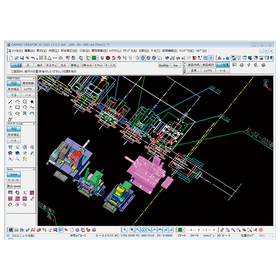
Interference Check Using CADPAC-CREATOR for the Machinery Industry

Thoroughly check for interference during the design phase with 2D/3D integrated design CAD!

In the machinery industry, interference checks during the design phase are essential to ensure product quality and safety. Interference between parts can lead to assembly defects and product malfunctions, resulting in increased costs due to rework. CADPAC-CREATOR integrates 2D and 3D data to visualize interference during the design phase, addressing these issues. This allows designers to quickly and accurately identify interference points and make necessary corrections. 【Usage Scenarios】 - Design of mechanical components - Simulation of assembly processes - Creation of 3D models of products 【Benefits of Implementation】 - Reduction of design errors - Decrease in rework labor - Improvement in product quality

  • cadpac-creator_02.png
  • 2D CAD machine
  • 3D CAD
  • Other CAD
  • Design CAD software

Added to bookmarks

Bookmarks list

Bookmark has been removed

Bookmarks list

You can't add any more bookmarks

By registering as a member, you can increase the number of bookmarks you can save and organize them with labels.

Free membership registration

Supports 6-layer substrates! PCB design CAD 【CADLUS One 6L】

Popular from the development manufacturer! A full-fledged PCB design CAD/CAM system that supports 6-layer boards!

CADLUS One 6L is a CAD/CAM system designed for professionals, supporting 6-layer circuit boards. It features an assist function that allows anyone to easily create circuit boards. By limiting the layers to 2 to 6, we offer it at a low price. It enables the design of inner layer power, ground thermal connections, and inner layer signal patterns. CADLUS One is a long-established CAD software that has been available for over 30 years. Its simultaneous parallel design function is the original in computer history and continues to evolve. Additionally, CADLUS One, developed by a printed circuit board design company, is equipped with truly necessary functions for printed circuit boards, and in terms of support, we can provide advice not only through software explanations but also by directly sending data.

  • Data conversion software
  • 2D CAD Electrical
  • Prototype Services
  • Design CAD software

Added to bookmarks

Bookmarks list

Bookmark has been removed

Bookmarks list

You can't add any more bookmarks

By registering as a member, you can increase the number of bookmarks you can save and organize them with labels.

Free membership registration